Portfolio Management · Personalization
#28 How to Build a Custom Stock Scanner Dashboard
04/16/2026 · 7 min read
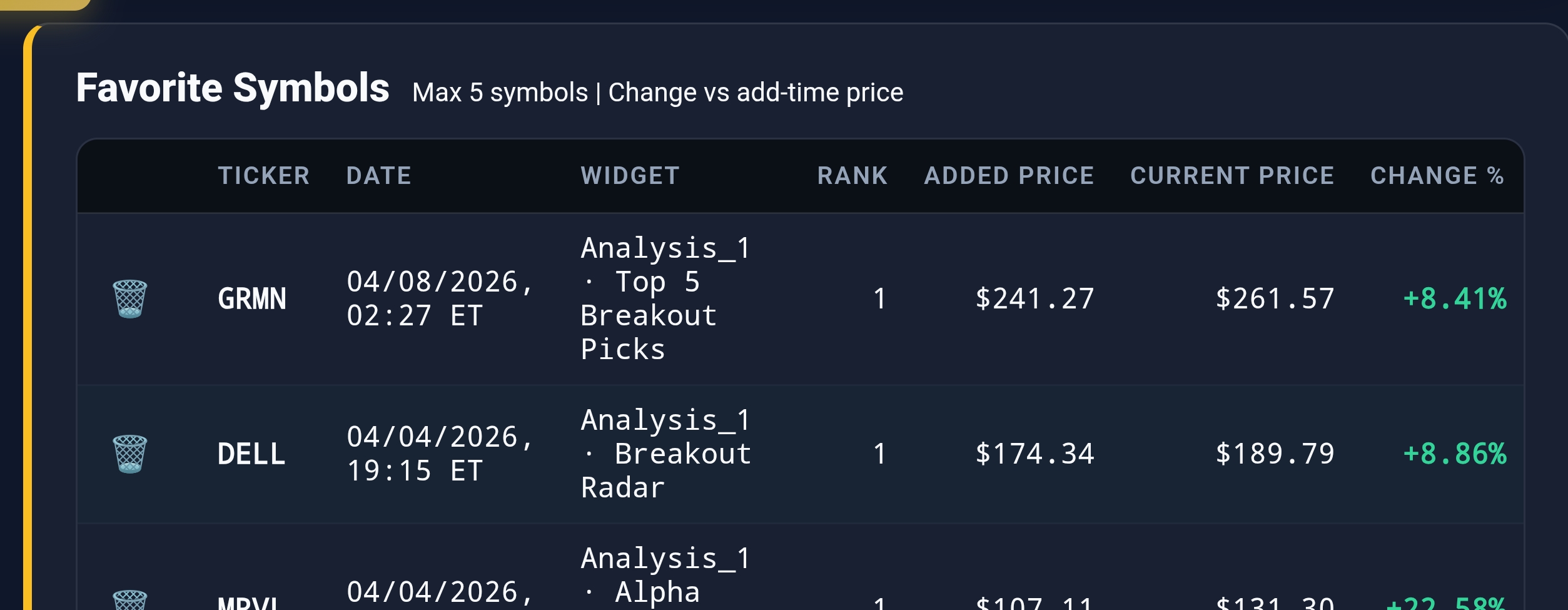
Live capture of Widget Favorites Panel in Inveflo.
📍 Home › ANALYSIS_1 › Widget Favorites Panel
0) Where to Find This Widget
From the 12-tile dashboard, open ANALYSIS_1,2. Look for the ★ (Star) / Favorites Icon next to each widget title or stock name. Click to add/remove from your Favorites Panel. Favorites persist across sessions in LocalStorage.
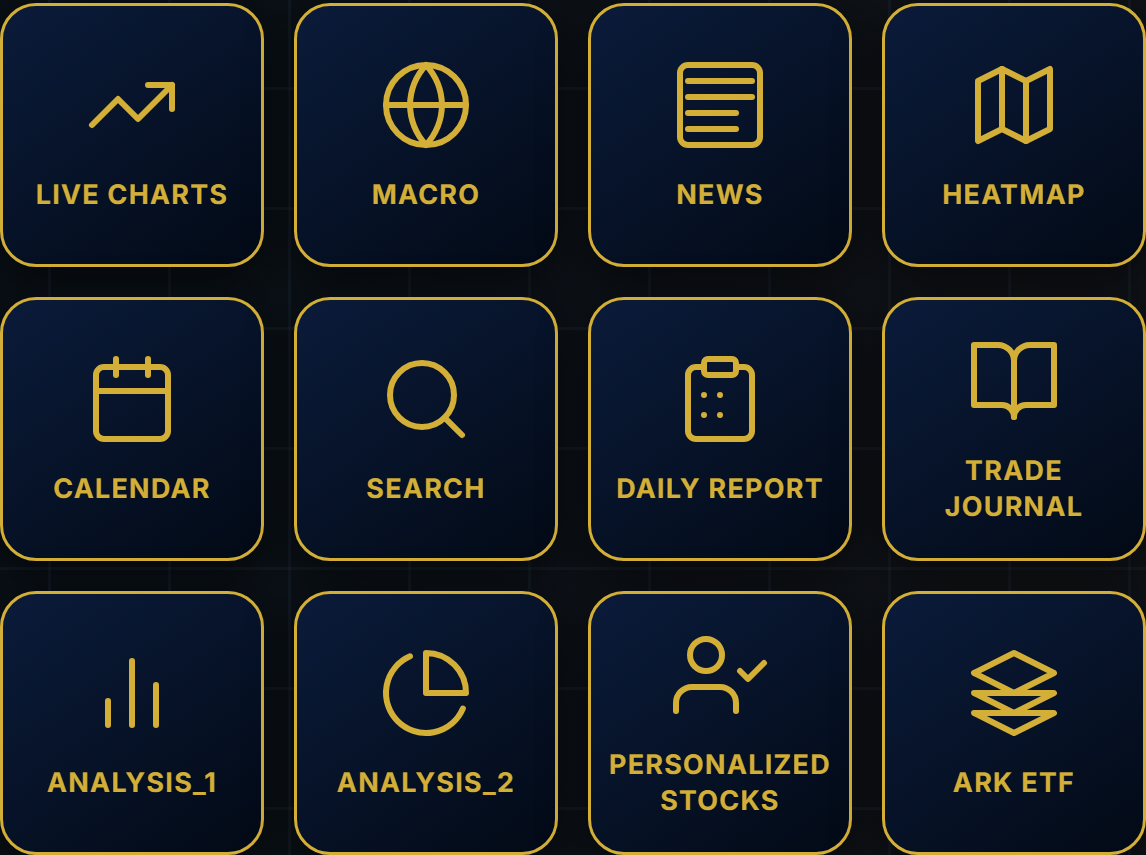
Live capture of Dashboard in Inveflo.
1) TL;DR
Star high-conviction setups to build a personal watchlist. Pin top 3-5 ideas to Top Picks tab. Tag each idea (ready-to-buy, watch-earnings, technicals-forming). Review daily, execute when triggered, archive when complete. Your custom dashboard transforms Alpha Discovery scanner into a personal trading system.
2) Hook (Pain-Driven)
Alpha Discovery scanner finds hundreds of setups daily. Without a way to track, I lose high-conviction ideas between sessions. I've missed catalyst dates because I couldn't find the stock again. Without discipline, I chase noise instead of focusing on my edge.
3) Problem
Too many ideas without tracking = chaos. You scan daily, find 50 stocks, star a few, then forget which ones have catalyst dates coming up. You re-scan the same names. You lack a personal portfolio of ideas. You need a system: star, pin, tag, and execute.
4) Solution (Widget Introduction)
Use Favorites Panel to curate signal flow into a personal watchlist. Star high-conviction setups instantly. Pin top 3-5 ideas to Top Picks for daily review. Tag each idea with workflow state (ready-to-buy, entry-triggered, active-trade, completed). Review pinned ideas pre-market. Execute when setup is live. Archive when done.
5) Logic Breakdown (Workflow + Thresholds)
Star ≥ 5-10 ideas daily → Pin Top 3-5 → Tag workflow state → Review daily → Execute → Archive
Each idea cycles: star → pin → tag (entry-ready) → triggered → active → completed → remove
- Tab 1: Top Picks (Pinned). Max 5 active ideas. Review pre-market daily. When triggered, execute. When closed, remove to make room.
- Tab 2: Watchlist (All Starred). 20-50 items typical. Scrollable list. For rotations, secondary ideas, ideas in development.
- Tab 3: Research (Working Notes). Catalyst date, key support, risk factors, entry signal, thesis notes. Build conviction before entry.
- Tag Discipline: ready-to-buy → css-forming → entry-triggered → active-trade → completed → remove (max 2+ weeks in Favorites).
6) Practical Use (IF X → THEN Y)
- If CSS ≥ 80 + catalyst upcoming (earnings Tues 4pm), then star, pin to Top Picks, tag "catalyst-watch". Review at catalyst release.
- If stock in Favorites for 2+ weeks without entry, then remove it. Either setup is not forming, or timing is off. Move capital to fresh ideas.
- If catalyst just triggered (NVDA beats earnings, gaps +4%), then move tag to "entry-triggered". Execute entry immediately. Update notes with entry price and stop.
- If trade closed (profit or stop), then archive from Favorites. Make space for next high-conviction setup.
7) Common Mistakes
- Too many pinned ideas (10+). Max 5 = focus. More = noise. Result: can't prioritize, miss signals.
- Star everything, review nothing. Favorites becomes a junk drawer. Result: no system, high friction.
- No tag workflow. Can't remember which ideas are ready to buy. Result: enters same stock twice, analysis paralysis.
- Hold loser ideas 3+ weeks. If not setup, move on. Capital in dead ideas = capital not in winners.
Frequently Asked Questions
How do I prevent my Favorites from becoming a junk drawer of 50+ ideas?
Enforce strict rules: (1) Only star CSS ≥70. (2) Max 5 pinned in Top Picks. (3) Max 50 total in Watchlist. (4) Review weekly, remove ideas without catalyst or technical setup. (5) Archive closed trades immediately. Treat Favorites as quality filter, not a historical database.
What's the difference between Watchlist and Top Picks tabs?
Top Picks (pinned, max 5): High-conviction ideas, catalyst incoming, ready-to-buy status. Review daily pre-market. Execute when triggered. Watchlist (all starred, 20-50 items): Secondary ideas, setups forming, lower conviction. For idea rotation and medium-term tracking. Archive from Top Picks when closed or catalyst passes.
Should I add notes to each Favorited idea?
Yes, for pinned ideas (Top Picks). Write thesis, key support level, catalyst date, entry signal, stop placement. Don't over-note watchlist ideas. Rule: if in Top Picks >3 days, notes must exist. Notes prevent re-analyzing same setup and speed up execution when triggered.
How often should I review my Favorites?
Daily: Pre-market, review Top Picks (5 min). Check for overnight gaps, catalyst releases, entry triggers. Weekly: Full Watchlist review. Remove stale ideas (no setup development in 10 days), archive closed trades. Don't obsess intraday. Daily review = discipline, hourly checking = FOMO/chaos.
Related Posts
CTA: Open Macro & Flow Dashboard
Open the live liquidity and capital-flow widgets to turn this guide into a weekly portfolio decision process.